
How to make an autoplaying video with the SmartVideo plugin for WordPress
A brief "how-to" for users of the SmartVideo plugin for WordPress
If you have the SmartVideo plugin for WordPress installed and want to learn how to make a video begin playback automatically, then you're in the right place.
If you have installed SmartVideo using another method and want to learn how to make a video begin playback automatically, take a look at our SmartVideo tag options article.
How to make a video autoplay
After adding a video to a page, click on Basic options in the block settings. You will now see a toggles for Autoplay, Muted, and Loop. Toggle the switch next to Autoplay. The video will now begin automatically as soon as possible once the page is loaded.
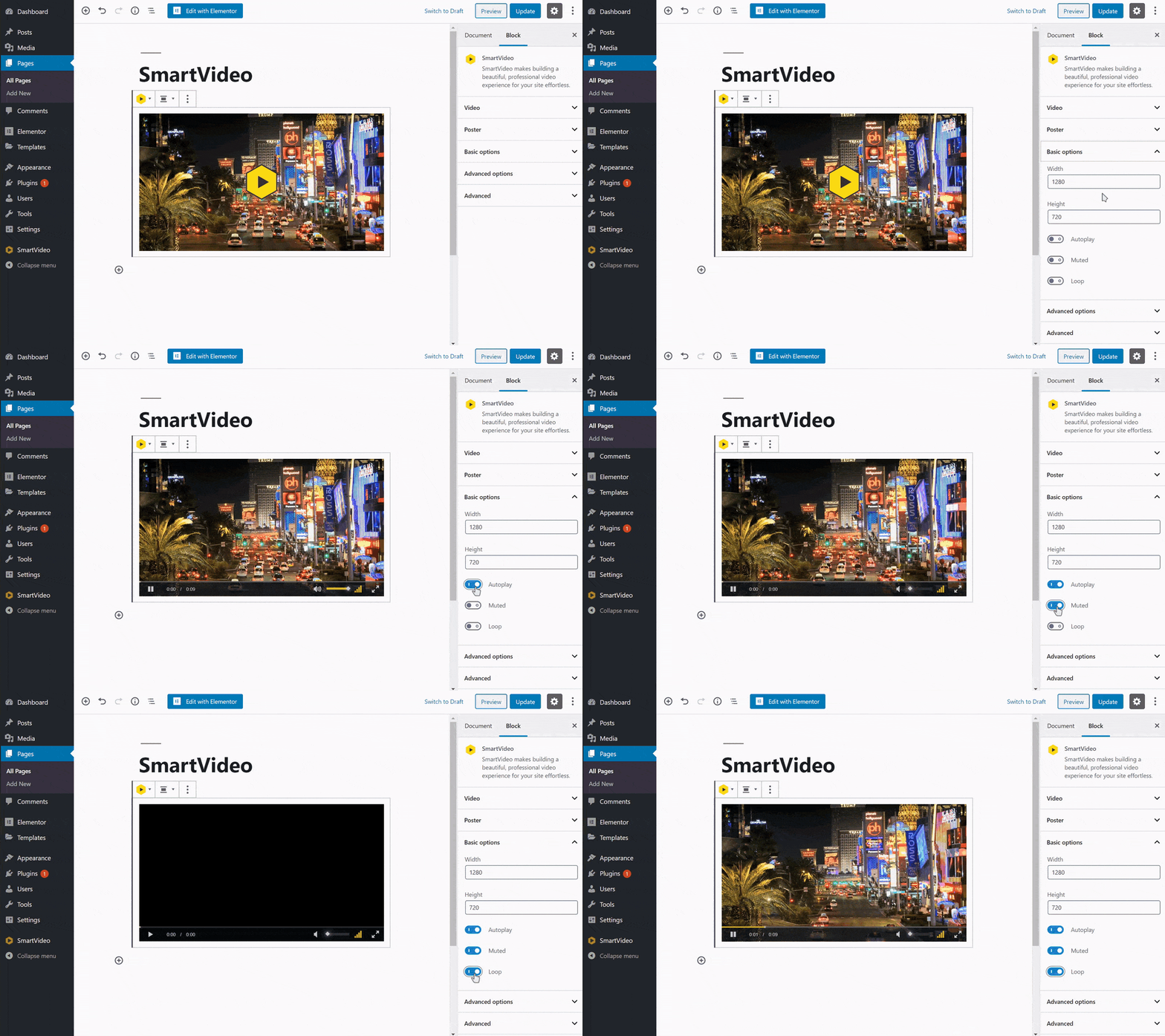
Pro tip: unless combined with muted, many browsers will restrict autoplay. We recommend only using autoplay in combination with muted. Also, Please note: enabling "Plays Inline" is essential for proper playback is IOS/Safari
Keywords: auto-play , auto play , auto-playing