
Can I use SmartVideo with Thrive Architect?
TL;DR: yes... mostly
Currently, Thrive Architect does not provide support for third party plugins in their builder. This means that we are unable to create a SmartVideo widget that works natively within their builder.
Fortunately, you can still add a SmartVideo manually using Thrive Architect’s WordPress Content block.
All you need to do is click Add Element and drag a WordPress Content block onto the page.
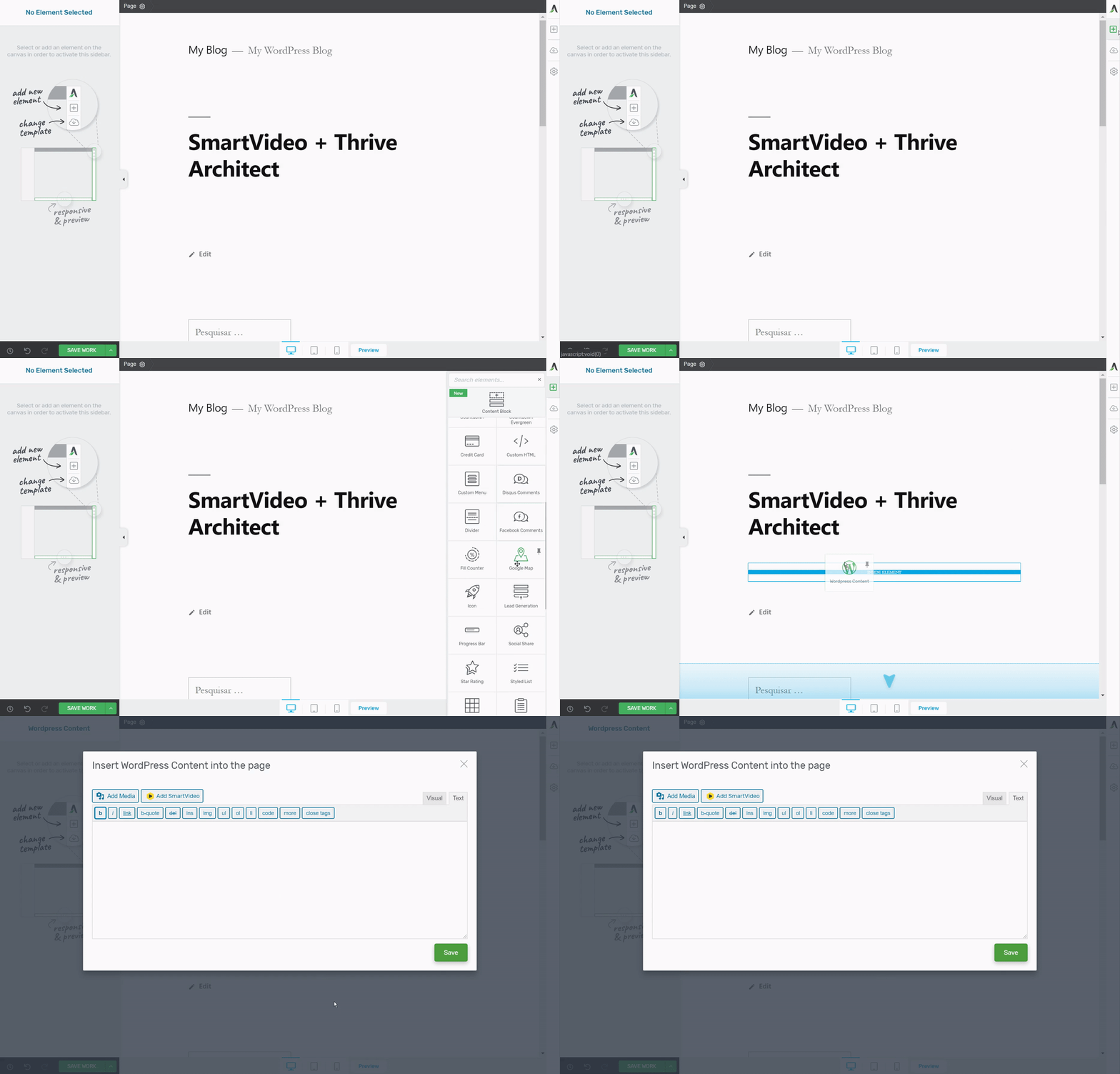
Make sure you’re in the text editor rather than the visual editor, paste in your SmartVideo tag, and click Save. You should now see the video on the page.
A note on YouTube: auto-conversion from YouTube is currently paused. We're exploring an importer-style replacement inside the SmartVideo library, but have no timeline to share. To put a YouTube video through SmartVideo today, download the video from YouTube and upload it to your SmartVideo library, then drop the SmartVideo tag onto your Thrive page using the WordPress Content block method described above.
If you have any questions, please let us know!